
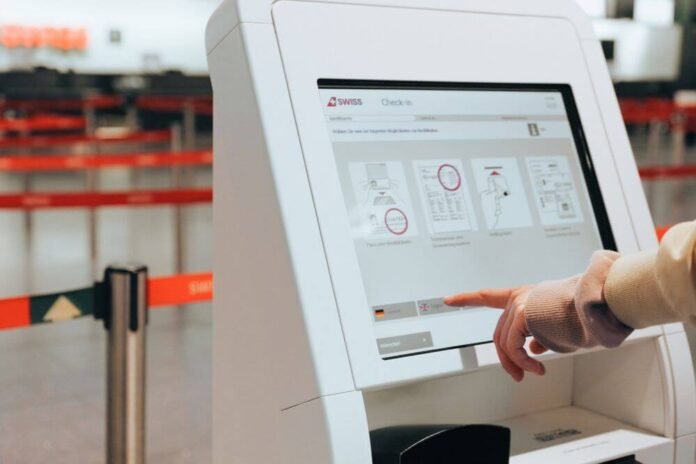
Operational efficiency has become a major consideration for businesses seeking to manage rising costs, changing customer expectations and increasingly complex service requirements. Organisations across retail, hospitality, transport and other customer-facing sectors are examining how digital technology can simplify routine processes without compromising service quality.
Interactive digital kiosks offer one solution by letting customers access information, complete transactions, and perform selected tasks through a dedicated interface. Businesses considering technology providers such as Evoke should evaluate how digital kiosk solutions can integrate with existing operations and support measurable improvements in service delivery. When designed and implemented well, interactive kiosks can help organisations reduce administrative pressure, improve customer flow, and use staff resources more effectively.
Why Operational Efficiency Matters in Customer-Facing Businesses
Operational efficiency involves using available resources effectively while maintaining appropriate service standards. In customer-facing environments, this often means balancing transaction volumes, staffing needs, customer expectations, and the time required to complete routine activities.
Inefficient processes can create long queues, repeated administrative tasks and inconsistent customer experiences. These problems may become more noticeable during peak periods when demand exceeds the capacity of traditional service points. Digital kiosks can add a service channel, allowing businesses to distribute routine interactions more effectively and reduce reliance on a single point of contact.
What Makes Interactive Digital Kiosks Different?
Interactive digital kiosks support two-way engagement between users and digital systems. Unlike conventional digital signage, which primarily displays information, interactive kiosks let customers make selections, enter details, and complete defined processes.
The equipment may include touchscreens, payment terminals, barcode scanners, printers, or other components, depending on its purpose. Software determines the available functions and how the interface communicates with relevant business systems. A kiosk’s effectiveness therefore depends on both the physical hardware and the quality of its digital experience.
Automating Routine Customer Transactions
Many customer-facing businesses handle repetitive activities that follow a predictable sequence. Examples include placing orders, confirming bookings, checking in or retrieving standard information. These processes may suit self-service technology when they can be completed through a clear, reliable digital interface.
Automation can reduce the time employees spend on certain routine tasks, allowing them to focus on activities that require judgement, problem-solving or personal interaction. However, not every process suits full automation. Businesses should identify which tasks customers can complete independently and where human assistance remains important.
Improving Customer Flow During Busy Periods
High customer volumes can place significant pressure on service counters and reception areas. When every interaction requires employee involvement, waiting times may increase as demand fluctuates. Interactive kiosks provide an additional channel for customers to complete suitable tasks.
By distributing transactions across multiple service points, businesses may improve customer flow and reduce congestion. The outcome depends on the number of kiosks, transaction times, and the service environment design. Poor placement or complicated interfaces can limit these benefits, making operational planning essential before installation.
Supporting Staff Productivity
One of the main potential benefits of interactive kiosks is their ability to change how staff allocate their time. When self-service equipment handles routine transactions, employees may have more capacity to assist customers with complex enquiries or provide more personalised support.
This does not mean that kiosks automatically reduce staffing requirements. Employees may still need to guide users, resolve technical problems and oversee transactions. Businesses should assess productivity improvements in terms of overall service performance rather than assuming that introducing kiosks will eliminate the need for human involvement.
Improving Order Accuracy and Information Consistency
Manual processes can be affected by communication errors, particularly in busy environments. Interactive kiosks allow customers to review their selections and confirm information before completing a transaction. This can help reduce certain misunderstandings associated with verbal ordering or data entry.
Digital interfaces can also present standardised information, helping businesses maintain consistency across customer interactions. However, accuracy depends on the information stored in the system and the reliability of its integrations. Outdated menus, incorrect prices, or poorly configured options can cause problems even when the interface works correctly.
The Importance of System Integration
Interactive kiosks work best when they connect properly with existing business systems. Depending on the application, this may involve payment processing, inventory records, booking platforms, order management or customer information systems.
Integration allows information to move between the kiosk and relevant operational processes. For example, an order placed through a kiosk may need to be transmitted accurately to another system for preparation or fulfilment. Businesses should establish compatibility requirements early and plan for system failures. Reliable integration is essential to avoid duplicate work and maintain consistent information.
Managing Costs and Evaluating Return on Investment
Investing in digital kiosks involves more than purchasing hardware. Businesses must consider software development or licensing, installation, payment integration, maintenance, connectivity and technical support. Additional costs may arise when existing systems require modification.
A meaningful return-on-investment assessment should compare these expenses with measurable operational benefits. Potential improvements may include shorter transaction times, reduced administrative workload, greater service capacity or improved order accuracy. Results vary by business model and implementation quality, so financial projections should be based on realistic assumptions rather than general industry claims.
Designing Kiosks for Different Business Environments
A kiosk suitable for a restaurant may not meet the requirements of a transport hub, retail store or healthcare facility. The operating environment influences screen size, enclosure design, accessibility, durability and the types of peripherals required.
Businesses should consider expected usage, available floor space, customer demographics and relevant environmental conditions. Equipment installed in a high-traffic public location may need different physical protection and maintenance arrangements from a kiosk used in a controlled indoor setting. Matching hardware and software to the intended application helps improve usability and operational reliability.
Accessibility and Inclusive Digital Services
Accessibility is an important consideration when introducing interactive customer technology. A kiosk that people with different physical or sensory needs cannot use comfortably may exclude customers and undermine the intended service improvements.
Design considerations include screen positioning, readable text, suitable colour contrast, clear navigation and alternative ways to obtain assistance. Businesses should review applicable accessibility obligations and test equipment with a representative range of users. Inclusive design can improve usability for a wider audience and reduce unnecessary difficulties during transactions.
Security and Data Protection
Some interactive kiosks process payments, personal information or booking details. These functions create responsibilities for data security and privacy. Businesses must consider how they collect, transmit, store, and protect information against unauthorised access.
Appropriate safeguards depend on the application and the types of data involved. Measures may include secure software configuration, access controls, regular updates and suitable transaction handling. Businesses should also ensure that customer information is not unintentionally exposed to subsequent kiosk users.
Maintenance and Long-Term Reliability
Interactive kiosks operate as part of a business’s service infrastructure, making ongoing maintenance important. Hardware faults, software errors, or connectivity problems can interrupt transactions and frustrate customers. Appropriate monitoring and maintenance arrangements should therefore support the equipment.
Businesses should establish how technical issues will be reported, who will repair them, and how software updates will be managed. It is also useful to plan alternative service arrangements for periods when a kiosk is unavailable. Reliable support helps protect the investment’s value and maintain customer confidence.
Using Performance Data to Improve Operations
Digital kiosks can provide useful operational information, depending on the available software and reporting capabilities. Businesses may examine transaction volumes, completion rates, common selections, and periods of high demand.
This information can support decisions about staffing, kiosk placement and interface improvements. However, data should be interpreted carefully and managed in accordance with relevant privacy requirements. Businesses should focus on measures that directly relate to their operational objectives rather than collecting information without a clear purpose.
Building a Long-Term Digital Service Strategy
Interactive kiosks should be part of a broader approach to improving customer service and operational processes. Businesses need to consider how kiosks interact with staff, mobile platforms, payment systems and other customer touchpoints.
A phased implementation can help organisations test assumptions, gather feedback and refine processes before expanding deployment. Regular performance reviews are equally important because customer needs and technology requirements may change over time. By focusing on usability, reliability and measurable outcomes, businesses can develop self-service solutions that support sustainable operational improvements.
Frequently Asked Questions (FAQs) About Interactive Digital Kiosks
How do interactive digital kiosks improve operational efficiency?
Interactive kiosks can automate routine transactions, reduce pressure on staffed service points, and deliver more consistent information. Their effectiveness depends on system integration, interface design, and the types of tasks they automate. Businesses should measure improvements against clearly defined operational objectives.
Are digital kiosks suitable for small businesses?
Digital kiosks may suit smaller businesses when transaction volumes, customer needs, and potential efficiency gains justify the investment. Costs should include hardware, software, installation and ongoing support. A detailed assessment matters because benefits vary by business model.
Can interactive kiosks improve order accuracy?
Kiosks can reduce certain communication errors by letting customers enter and review selections directly. However, accurate results depend on reliable software, correct product information and effective integration with order management systems.
What are the main costs associated with digital kiosks?
Costs may include equipment, software, installation, system integration, connectivity, maintenance and technical support. Additional expenditure may be necessary for specialist hardware or changes to existing business systems. Businesses should evaluate total ownership costs, not just the initial purchase price.
How can businesses measure the success of interactive kiosks?
Relevant measures may include transaction completion rates, average service times, customer satisfaction, equipment availability and staff workload. Comparing performance before and after implementation helps businesses determine whether kiosks are delivering meaningful operational benefits.